Yes you did not read wrong.
The director of the film took the word of New York and started filming pornography in 3D.
The original website is here.
http://tinyurl.com/22p5bg6
Its in spanish but I had used Google translated it for you guys!

Friday, November 26, 2010


Sunday, October 31, 2010
File Sharing Through Walls (Literally)
This may look like fakes to you:
 But they are real!
This thumbdrives are embedded inside walls all around New York City for people to share files offline. This are really usuable. Check their project out at http://datenform.de/blog/dead-drops-preview/
Maybe we can start this around Singapore too!
ps: Sorry for the slow update recently. I've been busy with some stuffs.
This thumbdrives are embedded inside walls all around New York City for people to share files offline. This are really usuable. Check their project out at http://datenform.de/blog/dead-drops-preview/
Maybe we can start this around Singapore too!
ps: Sorry for the slow update recently. I've been busy with some stuffs.
Monday, October 25, 2010
Battery Eater(Reveal its life)
Schools starting today for most poly students, thus you may not know if you laptop batteries still last for the next semester? Use Battery Eater
 This appliacation allows you to check your battery performance and much more.
Friday, October 22, 2010
Happy Meal That Do Not DECOMPOSE with Macdonald Official Reply
Alright, everyone might have seen this video below but amazingly, Macdonald replied.
Read Macdonald Offical Reply
Read Macdonald Offical Reply
Thursday, October 21, 2010
Some classic pranks found on youtube
So what happen is that the people who pulled the prank is at the airport. After flights from India and Thailand landed, they pass a note to the PA to search from some bogus names. Watch it to find out more!
Wednesday, October 20, 2010
Inkjet Vs Racing Car
Alright, Epson came up with an amazing test or advertisment. not sure if this is really true, but its just fun to watch. So sit back and grab some minute for this little amazing video.
Tuesday, October 19, 2010

Monday, October 18, 2010
Rescue the Chilean Miner
Now you can do it too! Rescue the 33 Chilean Miners that are trapped underground. This interactive flash game requires you to rescue them just like how they do it. Seems like there are allot of commercial benefits coming out from them being trapped.
Update: I found this picture below quite interesting
Update: I found this picture below quite interesting
 |
| Source |
Friday, October 15, 2010
The ways they scam.
Scammers are everywhere especially sim lim square. Recently, I went to sim lim square hoping to get an iPod Touch 4. Yes i know i should not get it there cause its full of scammers, but many place are out of stock, so...
Ok to cut things short here are some of the ways they going to scam you.
1. They quote the price higher than retail price.
So they told me SGD$468 (32GB) but the retail is only $428. So I further probe him. And then he said its cause of bundled casing and screen protector. But for $40??? Bullshit. He said its unlocked also. WTF? iPod touch can never be unlock. There is not carrier attached to it, what is there for you to unlock. I gave him the WTF face and he finally said, that its only add free games and jailbreak. After all this commotion, he finally gave up on scamming me. (I have no choice, many places were out of stock, but to negotiate with him till retail price. srsly negotiating for retail price, everyone would think wtf.)
2. They add GST.
So after the price is fix to be at 428 without anything. He asked me if i want to jailbreak it. I said no. I would not want my devices to be brick by him. (The tools just came out not long ago, and he do not know what he is using to jailbreak it when i asked him, yet he want to do for me for a fee. -.- ) So things settled and he wrote the receipt. He added GST. I was like wtf? Why is there GST and he is not telling us any shit?
I asked him again. This time he say it very loudly and claim everywhere includes GST. Then bet with me $20 if others place have GST. So I gave him few quotations in other stores. He gave up, lose face, and is very angry. But who cares. I am glad to see him this way for scamming others who are new to such devices.
Ok so i got my stuff, paid $428 (i forgot to tell him of his bet of $20, damn. But i think he would be raging. hahaha). I left immediately. He was cursing at the back for not earning addidtional $40 and the GST of nearly $20.
So to everyone buying things at Sim Lim Square, I would strongly urge you to check the price throughly before buying. And do not have to be scared to resist them cause they way they speak to you. You can just walk out if you are not happy with the price.
Ok to cut things short here are some of the ways they going to scam you.
1. They quote the price higher than retail price.
So they told me SGD$468 (32GB) but the retail is only $428. So I further probe him. And then he said its cause of bundled casing and screen protector. But for $40??? Bullshit. He said its unlocked also. WTF? iPod touch can never be unlock. There is not carrier attached to it, what is there for you to unlock. I gave him the WTF face and he finally said, that its only add free games and jailbreak. After all this commotion, he finally gave up on scamming me. (I have no choice, many places were out of stock, but to negotiate with him till retail price. srsly negotiating for retail price, everyone would think wtf.)
2. They add GST.
So after the price is fix to be at 428 without anything. He asked me if i want to jailbreak it. I said no. I would not want my devices to be brick by him. (The tools just came out not long ago, and he do not know what he is using to jailbreak it when i asked him, yet he want to do for me for a fee. -.- ) So things settled and he wrote the receipt. He added GST. I was like wtf? Why is there GST and he is not telling us any shit?
I asked him again. This time he say it very loudly and claim everywhere includes GST. Then bet with me $20 if others place have GST. So I gave him few quotations in other stores. He gave up, lose face, and is very angry. But who cares. I am glad to see him this way for scamming others who are new to such devices.
Ok so i got my stuff, paid $428 (i forgot to tell him of his bet of $20, damn. But i think he would be raging. hahaha). I left immediately. He was cursing at the back for not earning addidtional $40 and the GST of nearly $20.
So to everyone buying things at Sim Lim Square, I would strongly urge you to check the price throughly before buying. And do not have to be scared to resist them cause they way they speak to you. You can just walk out if you are not happy with the price.
Thursday, October 14, 2010
TeamViewer: Remote Access, Control, Chat

Teamviewer is an excellent choice for all users to remotely connect to their peers, or personal pc at home from office. All you need to do is to have internet connection on both side of the pc and teamviewer. You can run teamviewer both installed or use it as portable applications. But some functions may be not available. So its best to install.

Speedwise, its pretty fast, the only bottleneck maybe your internet connection. Other than that is very fast. A better option to use other than Msn Messenger to troubleshoot pc problem and transfering files. Saving allot of hassle in creating share folders.
To note: This application is free for personal use only. Thus if you are using it for a company, please buy this application.
Wednesday, October 13, 2010
Paint your own flame!
Create images like this
 simply with Flame Painter. Simple yet nice. Good for making a fast wallpaper for your own needs if you cannot find a good one.
How?
Just visit the website and created your images there and you are done.

How?
Just visit the website and created your images there and you are done.
Tuesday, October 12, 2010
Ultra Copier! Copies all your files!
Sick of windows and mac default copy and paste? Want something that can let you move your files and pause halfway? Ultra Copier is what you need.
This application is free and works on all platform.
This application is free and works on all platform.
Monday, October 11, 2010
Duck Duck GO!
Look Ma! No MOUSE!
Duck Duck GO another search engine BUT totally click free!
Awesome websites for keyboard fanatics that love to search without clicking with mouse, search and navigate your results entirely on mouse.
ps: remember to keep your javascript on.(its on my default on most browsers.)
Duck Duck GO another search engine BUT totally click free!
Awesome websites for keyboard fanatics that love to search without clicking with mouse, search and navigate your results entirely on mouse.
 |
| Source |
ps: remember to keep your javascript on.(its on my default on most browsers.)
Friday, October 8, 2010
Pin files to taskbar
A picture tells a thousand words.
Author Site (Download here)
This little program manages the file very well and allow users to quickly pin and access files from the taskbar, rather than going to the folder and selecting the files through few steps, thus shaving off few seconds that maybe wasted from the productivity.
 |
| Source |
This little program manages the file very well and allow users to quickly pin and access files from the taskbar, rather than going to the folder and selecting the files through few steps, thus shaving off few seconds that maybe wasted from the productivity.
Thursday, October 7, 2010
Free Legal Music For Everyone!
Yea people, Dance to the Grooves ~ ~
GrooveShark Presents : The free online music streaming.

GrooveShark Presents : The free online music streaming.
There is no terms and conditions, no gimmick, but music and some ads. And its fully free! This service have already been out there for quite some time, however i think its good to introduce it to more people.
Wednesday, October 6, 2010
Spaceships invade webs and destroy!
Yes! Destroy the entire websites.
Arrow keys to move, space to shoot.
Go to any website, load it up and paste this
javascript:var%20s%20=%20document.createElement('script');s.type='text/javascript';document.body.appendChild(s);s.src='http://erkie.github.com/asteroids.min.js';void(0);
into your url bar and a spaceship will appear. It will then destory all elements in the website when you fire your weapon!
Creator's URL
Some one actually created a video for this.
Arrow keys to move, space to shoot.
Go to any website, load it up and paste this
javascript:var%20s%20=%20document.createElement('script');s.type='text/javascript';document.body.appendChild(s);s.src='http://erkie.github.com/asteroids.min.js';void(0);
into your url bar and a spaceship will appear. It will then destory all elements in the website when you fire your weapon!
Creator's URL
Some one actually created a video for this.
Tuesday, October 5, 2010
Skin your window like never before!
Great for customization freaks! Customize literally everything you have on your desktop into any design that you want with RainMeter! This is an example of an customization.
You can change your default clock, a dynamic notepad of your to do list, arrange all your icons in fence like manner, have pokemon as your recycle bin, interactive icons and many more...
This customization platform has so many fans that there is a huge database of skins for the non geek to download and use it. There is also an forum for everyone to discuss and fully utilize the platform. It is so amazing that you have to try it to see it for yourself.
For geeks: you will love it so much that you will go to the extend of creating your own skins.
 |
| Source |
This customization platform has so many fans that there is a huge database of skins for the non geek to download and use it. There is also an forum for everyone to discuss and fully utilize the platform. It is so amazing that you have to try it to see it for yourself.
For geeks: you will love it so much that you will go to the extend of creating your own skins.
Monday, October 4, 2010
MyDefrag
MyDefrag. It sounds so bad. Indeed, i do agree that this application does not sound serious. But it is serious when it comes down to defragging your hard disk.
This application does what it needs to do, it defrags. As simple as that.
This application itself also had an GUI to show graphical color sector of your hard disk. Good for those who prefers to see it in colors. Rather than the plain "%" by the current window 7 defrag tools.
A very simple to use application but pack with tons of features for admins.Such as scripts that allows admins to schedule defrag jobs etc. But to most users out here, all you have to do is to run the simple defrag.
Feel free to explore the features when you get used to it. It is indeed handy.


 |
| Source |
This application does what it needs to do, it defrags. As simple as that.
This application itself also had an GUI to show graphical color sector of your hard disk. Good for those who prefers to see it in colors. Rather than the plain "%" by the current window 7 defrag tools.
A very simple to use application but pack with tons of features for admins.Such as scripts that allows admins to schedule defrag jobs etc. But to most users out here, all you have to do is to run the simple defrag.
Feel free to explore the features when you get used to it. It is indeed handy.
Friday, October 1, 2010
Defrag Defrag Defrag. WTH is it?
Defrag and Defrag, all your IT friends IT admins always ask you to do it. But WTH is it?
Copy, Move, Cut, Paste, Delete, Install, Uninstall, Download.... So on and so forth.
While doing all this minor operations, your hard disk is actually quite messy, is just that you do not know.
Lets say you have a new hard disk. It clean[physical - internal]. So you start adding stuff. Then they take up some space from your hard disk. And then you delete some of them.
Result? Your hard disk is messed up. But why? I had arrange the files in folders. Yes they are arranged on the appearance but not physically.
To simplify the explanation I am going to use an analogy.
There are 2 empty drink bottles A and B[capacity of 3L each], you have 4 semi-liquid object, Q,W, E, R, of 1L, 1L, 2L, 3L respectively.
1. You added in Q and W bottle A.
2. You want to add R into bottle A but its already half full, so you split(fragments) it up into 1L and 2L and put the remaining 2L into Bottle B. Thus there is fragmentation.
3. You decided to remove Q from bottle A.
4. Then you add E into Bottle A but it was full and you split it(fragments) into 1L and 1L
So now the bottle A contain some of W, E, R.
Bottle B contain some of R.
When you want to get whole of E, you have to retrieve it from 2 bottles, thus wasting your time. This is where defragments comes in. Defragmentations, will actually move W and E into bottle A and the remaining W into bottle B. Thus keep all related files altogether.
So a hard disk also work quite similarly, thus as a hard disk get used too often, they tend to slow down, and you should start defrag-ing your hard disk soon.
Copy, Move, Cut, Paste, Delete, Install, Uninstall, Download.... So on and so forth.
While doing all this minor operations, your hard disk is actually quite messy, is just that you do not know.
Lets say you have a new hard disk. It clean[physical - internal]. So you start adding stuff. Then they take up some space from your hard disk. And then you delete some of them.
Result? Your hard disk is messed up. But why? I had arrange the files in folders. Yes they are arranged on the appearance but not physically.
To simplify the explanation I am going to use an analogy.
There are 2 empty drink bottles A and B[capacity of 3L each], you have 4 semi-liquid object, Q,W, E, R, of 1L, 1L, 2L, 3L respectively.
1. You added in Q and W bottle A.
2. You want to add R into bottle A but its already half full, so you split(fragments) it up into 1L and 2L and put the remaining 2L into Bottle B. Thus there is fragmentation.
3. You decided to remove Q from bottle A.
4. Then you add E into Bottle A but it was full and you split it(fragments) into 1L and 1L
So now the bottle A contain some of W, E, R.
Bottle B contain some of R.
When you want to get whole of E, you have to retrieve it from 2 bottles, thus wasting your time. This is where defragments comes in. Defragmentations, will actually move W and E into bottle A and the remaining W into bottle B. Thus keep all related files altogether.
So a hard disk also work quite similarly, thus as a hard disk get used too often, they tend to slow down, and you should start defrag-ing your hard disk soon.
Thursday, September 30, 2010
Launchy, The one for Keyboard Fanatics
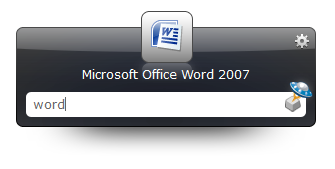
Launchy! Few keystrokes and there you go, launching your applications.
[Alt] + [Space] + "Word", that is all you need to launch your applications within your pc.
Plugins are also available to download for you to do task like exiting a computer process, open chat windows for messenger and also finding the multiple windows that you have just open. Great for speed typers on messenger.
You can change the skins for it too! With many skins available to choose and download from devianart, from glossy design to domo.
This applications is not only free, but also available for different platform, from Windows to Mac and Linux.
 | |
| Source |
Plugins are also available to download for you to do task like exiting a computer process, open chat windows for messenger and also finding the multiple windows that you have just open. Great for speed typers on messenger.
You can change the skins for it too! With many skins available to choose and download from devianart, from glossy design to domo.
This applications is not only free, but also available for different platform, from Windows to Mac and Linux.
Wednesday, September 29, 2010
Words Dominations
Word Domination simply dominate your crosswords puzzle. Filling your thoughts with letters to fill? It will fill em up for you!
This little web apps need no instructions. Its as easy as you can see. Choose the number of characters at the side, and fill the boxes with letters that you already have. Then it click [Search] it will populate words that you can fill them with.
Enjoy!
 | |
| Source |
Enjoy!
Tuesday, September 28, 2010
Temporarily Lock Out!
Now if you left your laptop at home or in school, you would normally lock them up to have privacy. But often people would go to the extend to guessing your password trying to unlock it to find your secrets.
Now I am going to teach you on how to lock them up temporarily with Command Prompt.
(Currently working on Win7 and Vista, have not tried it on others.)
Command Prompt (Do take note to follow each steps carefully, if you type in wrong you may get lock out.)
1. Right click on CMD (your command prompt) and click "Run as administrator"
2. Type in "net accounts", you will see that your lockout threshold is none
3. Type in "net accounts /lockoutthreshold:3", this will change the max tries to 3
4. Type in "net accounts /lockoutduration:30", this will chage the lockout time to 30 mins
5. Type in "net accounts /lockoutwindow:30", this will reset the number of incorrect logins after 30 mins.
6. Type in "net accounts", to see the updated changes
Quick Tip: You can always lock your computer with [Win]+[L]
Now I am going to teach you on how to lock them up temporarily with Command Prompt.
(Currently working on Win7 and Vista, have not tried it on others.)
Command Prompt (Do take note to follow each steps carefully, if you type in wrong you may get lock out.)
1. Right click on CMD (your command prompt) and click "Run as administrator"
2. Type in "net accounts", you will see that your lockout threshold is none
3. Type in "net accounts /lockoutthreshold:3", this will change the max tries to 3
4. Type in "net accounts /lockoutduration:30", this will chage the lockout time to 30 mins
5. Type in "net accounts /lockoutwindow:30", this will reset the number of incorrect logins after 30 mins.
6. Type in "net accounts", to see the updated changes
Quick Tip: You can always lock your computer with [Win]+[L]
Monday, September 27, 2010
Photography: Panning
This tutorial will show you how to get images like this:
The technique to capture images like this is called panning. To get this picture, you have to press the shuttle button when the car is within your viewfinder and move slightly to the direction in which the vehicle is moving as you press it. Thus all the background is blurred except the moving object.
It may not be easy to start as you need to know how much to move your camera with respective of the moving object speed.
So in order to get more pictures that are like this, you need to have practice, practice and more practice.
 |
| Image taken at SG GP on 25 Sept 2010 |
The technique to capture images like this is called panning. To get this picture, you have to press the shuttle button when the car is within your viewfinder and move slightly to the direction in which the vehicle is moving as you press it. Thus all the background is blurred except the moving object.
It may not be easy to start as you need to know how much to move your camera with respective of the moving object speed.
So in order to get more pictures that are like this, you need to have practice, practice and more practice.
Friday, September 24, 2010
You Tube Time Machine
YT Time Machine Lets you travel to the past with just a click!
 What Youtube Time Machine does is that it allows you to scroll the timeline given, and then it shows you videos related to that year. Ranging from 1860 to 2010. Yup its 1860, no error here. Its refering to video taken since 1860(Not about video uploaded in 1860 :P ).

Thursday, September 23, 2010
Beware of Scams!
This is a warning to everyone, regardless of whether you are Local or Foreigners
So heres what happen, my camera batteries were spoilt (used for 3 years), so I intended to went down to Funan IT Mall to get one since I were near there (i was there for Singtel Accelerate Conference, i.e i was not blogging ytd).
Before I enter Funan, there was a store nearby selling camera stuff as well, and the person quoted me the battery for SGD$75. I was amazed at the price that he quoted me, and asked him why is the price so expensive, he claimed that its caused of the capacity(5800mAh) of the batteries. Well, to what I remember, the last time i bought it for around SGD$30.
Then I decided to check around in Funan IT Mall, so Store #2 (I shall call them this way) have the same brand batteries but half the capacity(2800mAh) and charge me SGD$30 as well,thus I move to Store#3 they had (5800mAh) at SGD$65. Still quite expensive, I thought to myself, then I head to Store #4. The place where i got most of my equipments from. Ps(Its been abt half a year since I did photography, due to attachment).
And finally, I got what I wanted. 5800mAh at SGD$25.
So you see, even though you are a local, at Funan IT Mall(Highly Trustworthy IT Mall), NOT Sim Lim Square(Many black shops that charge at exorbitant prices), there can also be people who sell you things at so high price.
In conclusion, do some research on the market prices of certain product before buying them. Ignore all their claims. Just buy what you need and go. Often they will try to tempt you to buy more stuff that you do not need.
So heres what happen, my camera batteries were spoilt (used for 3 years), so I intended to went down to Funan IT Mall to get one since I were near there (i was there for Singtel Accelerate Conference, i.e i was not blogging ytd).
Before I enter Funan, there was a store nearby selling camera stuff as well, and the person quoted me the battery for SGD$75. I was amazed at the price that he quoted me, and asked him why is the price so expensive, he claimed that its caused of the capacity(5800mAh) of the batteries. Well, to what I remember, the last time i bought it for around SGD$30.
Then I decided to check around in Funan IT Mall, so Store #2 (I shall call them this way) have the same brand batteries but half the capacity(2800mAh) and charge me SGD$30 as well,thus I move to Store#3 they had (5800mAh) at SGD$65. Still quite expensive, I thought to myself, then I head to Store #4. The place where i got most of my equipments from. Ps(Its been abt half a year since I did photography, due to attachment).
And finally, I got what I wanted. 5800mAh at SGD$25.
So you see, even though you are a local, at Funan IT Mall(Highly Trustworthy IT Mall), NOT Sim Lim Square(Many black shops that charge at exorbitant prices), there can also be people who sell you things at so high price.
In conclusion, do some research on the market prices of certain product before buying them. Ignore all their claims. Just buy what you need and go. Often they will try to tempt you to buy more stuff that you do not need.
Tuesday, September 21, 2010
UberStudent Thats All a student will need.
Being a student who just bought a new pc? or just reformatted an old pc and need a new OS?
Uberstudent is the choice.
Its free
Comes with all required software
And its all ready to use!
This Linux OS pack for student itself contains software that a student will need most frequently, such as
Graphics Editor
Words Processor
Internet Browser and many more...
Uberstudent is the choice.
Its free
Comes with all required software
And its all ready to use!
 |
| Source |
Graphics Editor
Words Processor
Internet Browser and many more...
Monday, September 20, 2010

Friday, September 17, 2010
IE Restorer: Your personal network admin
Many a times we will have problem with our network, thus leaving us with an internet explorer but without internet access. Worst still, it may be in the middle of the night when you are rushing for research yet you do not know who to ask for help.
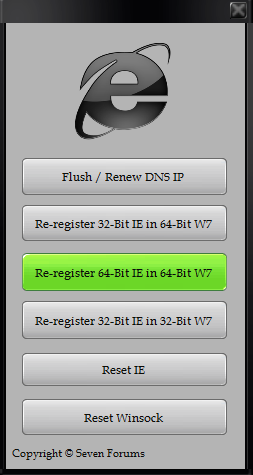
Here comes IE Restorer. This little application actually allows you to reset your internet explorer to default settings on either 86x or 64x Windows 7 or any older OS with .NET Framework installed 3.5.
If you are using Firefox or other browser, thus utility can still be used for flushing your dns or resetting your winsock. (It does not matter if you do not know what it means you can just click and try to see if it fixes your internet connection. :P )
Here comes IE Restorer. This little application actually allows you to reset your internet explorer to default settings on either 86x or 64x Windows 7 or any older OS with .NET Framework installed 3.5.
If you are using Firefox or other browser, thus utility can still be used for flushing your dns or resetting your winsock. (It does not matter if you do not know what it means you can just click and try to see if it fixes your internet connection. :P )
 |
| Source |
Thursday, September 16, 2010
Create your own Portable Applications
Want to create your own applications and bring to school or work? Most people would need this program type of program because they do not have the rights to install stuff over their pc. Thus leaving them a pc without their favourite programs.
Cameyo is the hero to save you from the administrative villians!
What Cameyo actually does is that it will take a snapshot of the programs in your pc. Then you install the programs that you want to make it portable. Then Cameyo take another snapshot of you pc.
It will then create the package of the file that you have installed and allow you to bring it wherever you go. Best of all this application creates all the programs in .exe thus there is no folders that you need to mess around with.
ps: do not use this to create illegal copies of software.
Cameyo is the hero to save you from the administrative villians!
What Cameyo actually does is that it will take a snapshot of the programs in your pc. Then you install the programs that you want to make it portable. Then Cameyo take another snapshot of you pc.
It will then create the package of the file that you have installed and allow you to bring it wherever you go. Best of all this application creates all the programs in .exe thus there is no folders that you need to mess around with.
 |
| Source: Cameyo |
 |
| Source: Cameyo |
Wednesday, September 15, 2010
Down for everyone or just me??
OMG! I cant access the website. Its down. *GASP* :O!!!
Yea, times like this always happen. You will think that the site is down.
But sometimes is your own network problem.
Down for everyone or just me allows you to check if the website is down or its just you.
This website actually pings the web url that you have entered and let you know the actual status of the web.
So next time before you curse and swear at the web server, do check this out first.
Yea, times like this always happen. You will think that the site is down.
But sometimes is your own network problem.
Down for everyone or just me allows you to check if the website is down or its just you.
This website actually pings the web url that you have entered and let you know the actual status of the web.
So next time before you curse and swear at the web server, do check this out first.
Tuesday, September 14, 2010
Color Picker!
Help those who are color blind to pick up colors. Hahaha, just joking.
Color Picker is a software that let you find out what is the current color being implemented at the source of your selection. Most image editing software only allows user to determine the color of the image inside the program, which means if you want to get the color code for the image on the web, you have to download it and open up the image and choose.
But with this application you can immediately get the code of the screen without the need for any more software.
Oh yes, one more thing, this application is free for use for Windows user!
Color Picker is a software that let you find out what is the current color being implemented at the source of your selection. Most image editing software only allows user to determine the color of the image inside the program, which means if you want to get the color code for the image on the web, you have to download it and open up the image and choose.
But with this application you can immediately get the code of the screen without the need for any more software.
 |
| Source: http://www.colorschemer.com/ |
Monday, September 13, 2010
Go There! Your route planner
Need to Go There? But you do not know how to go?
Use Gothere! This website allow you to search on how you can reach a place to another, showing you the directions, time required, different routes and even taxi fares.
However this is only available for Singapore!
 |
| Source: http://www.nus.edu.sg/ |
Use Gothere! This website allow you to search on how you can reach a place to another, showing you the directions, time required, different routes and even taxi fares.
However this is only available for Singapore!
Friday, September 10, 2010
Google Instant Search
Google is just getting faster!
Google recently launches its Instant Search whereby it allow user to view results even before they hit [Search].
Which means, the page will populate different results as you type. However, this service is not yet available to Singapore and most part of Asia, and they will roll it out soon.
To those that wish to try it out, they may go to Google main search page, then click on
[Go to www.google.com]
But is is really faster? Here is a test by lifehacker.com
Google recently launches its Instant Search whereby it allow user to view results even before they hit [Search].
Which means, the page will populate different results as you type. However, this service is not yet available to Singapore and most part of Asia, and they will roll it out soon.
To those that wish to try it out, they may go to Google main search page, then click on
[Go to www.google.com]
But is is really faster? Here is a test by lifehacker.com
Thursday, September 9, 2010
Type in Fancy Fonts!
Tired of all those plain old fonts in your PC?
Its time to install new fonts!
First go to either DaFont or Urban Fonts to search and download the fonts you like.
Next unzip the fonts file.
Then.
Windows 7 and Vista Users
Right click on the unzip fonts and click install fonts. Then you are done. Open up Microsoft Words or any other programs and you can see those fonts inside for you to use.
Windows XP Users
Go to Start> Run > Type in (without the quotes) "%windir%\fonts" and press "OK"
Click on files> install new fonts
Select the folder where you stored the fonts and install it.
Thats it. As simple as that.
Note: The font is only viewable in your pc, so others who do not have the font installed, they cannot view it. Unless you use those font to create a image in paint etc, they have to install the same font to view it.
Its time to install new fonts!
First go to either DaFont or Urban Fonts to search and download the fonts you like.
Next unzip the fonts file.
Then.
Windows 7 and Vista Users
Right click on the unzip fonts and click install fonts. Then you are done. Open up Microsoft Words or any other programs and you can see those fonts inside for you to use.
Windows XP Users
Go to Start> Run > Type in (without the quotes) "%windir%\fonts" and press "OK"
Click on files> install new fonts
Select the folder where you stored the fonts and install it.
Thats it. As simple as that.
Note: The font is only viewable in your pc, so others who do not have the font installed, they cannot view it. Unless you use those font to create a image in paint etc, they have to install the same font to view it.
Tuesday, September 7, 2010
Format Factory: The only converter that you ever need.
The one and only Media Converter that you will ever need: Format Factory
This little software is a free software that basically convert any format that is actually available into your desire format. The user interface is simple and unique and task making all first time users able to familarize them self with it very fast.
Speed wise for this software is roughly about the same as other media converter and what left is determined by the processing power of your processor, hard disk speed and ram that is available in your pc.
If you want to compress a video into a smaller size, there are few configurations that you can do it within the profile settings for the conversion. You can reduce the resolution of your video, or reduce the quality of the audio. In that way, your video will be smaller. One last thing, the format that you choose to convert it to will also affect the size of the output.
This article is requested from Alan, this is what he wrote in his comments:
Hi Sg Tech Assist,
Thanks so much for your pc tips, i've been following your blog so far.
Can you recommand lobang for any ideas / softwares that can compress a 115mb mpeg4 video into a much smaller size (say by 20%-30%).
So as to make it less time-consuming & faster for me to upload to my blog?
Thanks,
Alan
Hey Alan, thanks for the support, hope this article helps you. Btw since you are posting the video up to a blog, do take note that some video format may not be supported by the blog. Do check before converting.
 |
| Image Source:http://www.mp3q8.ws |
 |
| Source: formatoz.com |
If you want to compress a video into a smaller size, there are few configurations that you can do it within the profile settings for the conversion. You can reduce the resolution of your video, or reduce the quality of the audio. In that way, your video will be smaller. One last thing, the format that you choose to convert it to will also affect the size of the output.
This article is requested from Alan, this is what he wrote in his comments:
Hi Sg Tech Assist,
Thanks so much for your pc tips, i've been following your blog so far.
Can you recommand lobang for any ideas / softwares that can compress a 115mb mpeg4 video into a much smaller size (say by 20%-30%).
So as to make it less time-consuming & faster for me to upload to my blog?
Thanks,
Alan
Hey Alan, thanks for the support, hope this article helps you. Btw since you are posting the video up to a blog, do take note that some video format may not be supported by the blog. Do check before converting.
Mouse Fighter, You will never need mouse again!
Tired of shifting your hands between the keyboard and mouse?
Mouse Fighter is here to help!
Mouse Fighter allows you to remove the need for a mouse and be solely dependent on your keyboard.
This nifty application actually replace your mouse cursor controls with your keyboard arrows keys. Good for those who are on laptop where the touch pad is really hard to use at times.
Best of all this software is free!
Mouse Fighter is here to help!
Mouse Fighter allows you to remove the need for a mouse and be solely dependent on your keyboard.
 |
| Source: MouseFighter.com |
Best of all this software is free!
Monday, September 6, 2010
Hard Disk space differ from advertised
So you did you buy a new hard disk from the Comex that ended yesterday?
Imagine this: You bought a 2TB hard disk and went home happily and plug it into your computer. But to your dismay it only shows up as 1.8TB. You feel cheated by the company. But this happens to all manufacturer. Why?
This is due to the fact on how manufacturer and Windows(If you are using windows) determine memory unit.
Data is stored in a unit called binary, the actual calculation would be using base 2 calculations(maths related, i shall not explain further as it will be another topic).
So Windows actually calculate memory base on base 2, thus making 1024 MB equivalent to 1GB and 1024 GB to be equivalent to 1TB.
But the manufacturer calculate the memory based on decimal. In another words, to them, 1000 MB is 1GB. Thus this explain what you see on label is not what you will get from using.
So in conclusion, do not expect to get a full 2TB if you are buying a 2TB hard disk. Hopefully, they manufacturer would stop all this marketing stunt tell us what base they are using on the label to prevent misconceptions.
 |
| Source: TechFresh.net |
This is due to the fact on how manufacturer and Windows(If you are using windows) determine memory unit.
Data is stored in a unit called binary, the actual calculation would be using base 2 calculations(maths related, i shall not explain further as it will be another topic).
So Windows actually calculate memory base on base 2, thus making 1024 MB equivalent to 1GB and 1024 GB to be equivalent to 1TB.
But the manufacturer calculate the memory based on decimal. In another words, to them, 1000 MB is 1GB. Thus this explain what you see on label is not what you will get from using.
So in conclusion, do not expect to get a full 2TB if you are buying a 2TB hard disk. Hopefully, they manufacturer would stop all this marketing stunt tell us what base they are using on the label to prevent misconceptions.
Friday, September 3, 2010
7-Zip: Extract your zip, rar, 7z, bz2, .tar
Zip and unzip, split and join.
7-Zip is the only program that you will ever need to zip and unzip any type of compression availble. This also allows you to unzip a mac compressed folder on a windows machine. Best of all this is open source!
7-Zip allows you to compress your folder into 7z archive and also split compressed files into multiple parts for easy transmission to all your friends.
7-Zip is always compared with Winrar, however in my own opinion, 7-Zip is the winner.
7-Zip is free but Winrar is a shareware, thus providing limited function.
And it can extract more types of compressed files then Winrar.
Download 7-Zip here.
Screen Shots (From 7-Zip.org)

7-Zip is the only program that you will ever need to zip and unzip any type of compression availble. This also allows you to unzip a mac compressed folder on a windows machine. Best of all this is open source!
7-Zip allows you to compress your folder into 7z archive and also split compressed files into multiple parts for easy transmission to all your friends.
7-Zip is always compared with Winrar, however in my own opinion, 7-Zip is the winner.
7-Zip is free but Winrar is a shareware, thus providing limited function.
And it can extract more types of compressed files then Winrar.
Download 7-Zip here.
Screen Shots (From 7-Zip.org)
Thursday, September 2, 2010
Apple Music Event
Apple have just release some new gadgets, these includes
Check them out at Gizmodo below:
Apple New Gadgets
*I had actually link up all images and added more description, but an error occured with blogspot and would not let me publish.
- iPod Touch with 2 cameras and retina display
- iPod Nano with touch screen
- iPod Shuffle with Buttons and voice over
Check them out at Gizmodo below:
Apple New Gadgets
*I had actually link up all images and added more description, but an error occured with blogspot and would not let me publish.
OpenNet and Fibre Optic Network
So now Fibre Optic is out but should you really upgrade?
Many people called the Fibre Optic Network as OpenNet but they are wrong. OpenNet is just a company that are the one that is building the Fibre Optic network in Singapore. So what is so good about Fibre Optic?
Fibre Optic are lines that are like your network cable, but they are made of fibre optic instead of copper.
Thus this allow the signal to be transmitted over long distance without being weaken as signals are transmitted over by reflection of the lights within the fibre optic. It is also capable of transmitting data at the speed in Gigabits. But do you really need it?
This is a scenario, for example you sign up for the slowest fibre optic from a ISP. Which gives you a speed of 150Mbps (Megabits, NOT Megabytes). Meaning you can download your videos etc at the speed of 18.75 (MBps)Megabytes per second.
But there are several factor that you may need to consider (for individual users only):
1. The max speed that your local lan is 100Mbps, thus there is a wastage of 50Mbps.
2. The max speed of most wifi router (G standard) is only going at 54Mbps. (If you have excellent signal)
3. Even if you have a N standard wifi gateway(theoretical speed of 300Mpbs), you only get around 150 Mbps. More info here.
4. Most website content are so light(normal web surfing or project work) that even if you are on 3Mbps broadband, you already do not see much delay.
5. Some website servers have their own upload limit, they could not even deliver you the content to the speed of your download.
6. Unless you have many users at home, download lots of stuff, running a server you do not need to get fibre optic. A high speed broadband would be more than sufficient.
Do take note that Mbps and MBps are 2 different units.
Many people called the Fibre Optic Network as OpenNet but they are wrong. OpenNet is just a company that are the one that is building the Fibre Optic network in Singapore. So what is so good about Fibre Optic?
Fibre Optic are lines that are like your network cable, but they are made of fibre optic instead of copper.
 |
| Source: Broadband-finder.co.uk |
This is a scenario, for example you sign up for the slowest fibre optic from a ISP. Which gives you a speed of 150Mbps (Megabits, NOT Megabytes). Meaning you can download your videos etc at the speed of 18.75 (MBps)Megabytes per second.
But there are several factor that you may need to consider (for individual users only):
1. The max speed that your local lan is 100Mbps, thus there is a wastage of 50Mbps.
2. The max speed of most wifi router (G standard) is only going at 54Mbps. (If you have excellent signal)
3. Even if you have a N standard wifi gateway(theoretical speed of 300Mpbs), you only get around 150 Mbps. More info here.
4. Most website content are so light(normal web surfing or project work) that even if you are on 3Mbps broadband, you already do not see much delay.
5. Some website servers have their own upload limit, they could not even deliver you the content to the speed of your download.
6. Unless you have many users at home, download lots of stuff, running a server you do not need to get fibre optic. A high speed broadband would be more than sufficient.
Do take note that Mbps and MBps are 2 different units.
Wednesday, September 1, 2010
Comex 2010 IT Fair!
Comex is here again! It will be from Sept 2 to Sept 5 2010
For every 3 months there would be an IT Fair in Singapore.
To help those who want to check out the deals before going down go to Boot Strike they have most of the brochure for Comex and previous show. So you can make your decision before going down.
But take note, most times, when you are at the Comex, the price may be better then listed on the brochure.
Some tips for IT Fair.
1. Wear shoes, you may get step by people in the crowd.
2. For gadgets like TVs and Laptops, wait for last day, they would always be cheaper.
3. Go early for special deals that are normally limited.
4. Check around the booths for the same product, they often have different price.
5. Memory cards, rams, hard disk are normally cheaper in IT Fair.
Update:
Here is the link to Comex
 |
| Source: Comex |
For every 3 months there would be an IT Fair in Singapore.
To help those who want to check out the deals before going down go to Boot Strike they have most of the brochure for Comex and previous show. So you can make your decision before going down.
But take note, most times, when you are at the Comex, the price may be better then listed on the brochure.
Some tips for IT Fair.
1. Wear shoes, you may get step by people in the crowd.
2. For gadgets like TVs and Laptops, wait for last day, they would always be cheaper.
3. Go early for special deals that are normally limited.
4. Check around the booths for the same product, they often have different price.
5. Memory cards, rams, hard disk are normally cheaper in IT Fair.
Update:
Here is the link to Comex
Gmail Shortcuts
To all Gmail users out there! I find this video very useful to all of you.
Source: Lifehacker
Source: Lifehacker
Tuesday, August 31, 2010
One player does All: VLC
With increasing types of video and formats available, many people do not know how to playback them, but thankfully there is VLC. You do not have to download any specific codec to play back your favourite video or audio. Just use VLC and its open source! VLC is fast and and simple. It can simply playback any format available.
If you have a movie with subtitles or audio to fast, there is sync option for you to speed it up or slow it down. This media player also allow you to set a video as desktop wallpaper.(For people who want to work and watch at the same time)
VLC is also available for different OS, Mac, Windows, Linux.
For advance users: There is also an function called network streaming. If you have any video or audio files stored online, you can stream it directly from vlc by entering its url. It is at File> Network stream.
Some screenshots:
If you have a movie with subtitles or audio to fast, there is sync option for you to speed it up or slow it down. This media player also allow you to set a video as desktop wallpaper.(For people who want to work and watch at the same time)
VLC is also available for different OS, Mac, Windows, Linux.
For advance users: There is also an function called network streaming. If you have any video or audio files stored online, you can stream it directly from vlc by entering its url. It is at File> Network stream.
Some screenshots:
 |
| Source: VLC |
 |
| Source: VLC |
 |
| Source: VLC |
Monday, August 30, 2010
Youtube Video Downloader
So you have a youtube video that you like allot but do not know how to download?
Check out Keep Vid this is an online youtube downloader, all you have to do is to copy the url of the youtube video and paste it inside and click download.
This website will then search for the embedded video source in the url that you sent and give you several options to download your youtube video in the available fomat and resolution. Thats it! Its as simple as that, give you a try!
Check out Keep Vid this is an online youtube downloader, all you have to do is to copy the url of the youtube video and paste it inside and click download.
This website will then search for the embedded video source in the url that you sent and give you several options to download your youtube video in the available fomat and resolution. Thats it! Its as simple as that, give you a try!
Friday, August 27, 2010
Audacity: Audio Editor
 |
| Source: Audacity |
Yes! Another open source product with so many functions that you can imagine, its Audacity!
This is an audio editor with many functions just like a professional audio editor. It allows you to convert audio files to wav for editing and converting them back to mp3, but you may need to download their encoder. And its very simple.
Despite the simple interface, they actually have options for you to reverse your audio and there are also many plugins available for download. One good example would be to allow you to remove the voice of the singer in the mp3 and to get only the music behind it.
This program itself also comes as installer for Windows, Mac, Linux. So no worries about what platform you are in, they are there for you.
To get more information check it out here : Audacity
 |
| Audacity (Source: Audacity) |
Thursday, August 26, 2010
Google Documents: Online Office Suite
 |
| Source: Google |
Now I am going to introduce to you the Google Documents, an online Office Suite web application.
This is an online web application. Thus there is no need to install anything onto your computer. You can use it on the go and its Free! *You need to have a Google account and internet connection and web browser to use it.
They are not only an online office suite but also come with extra features like online collaboration and cloud storage. Meaning when you create a document, you store it online in their Google server instead of your local pc, in another word ,it does not take up any space in your hard disk.
After you have created your document, you can then share it with everyone and also let them edit it. Thus a very good tool for students to use for their project work. They also allow you to upload you Microsoft Word Documents for online collaboration as well, but need to convert to Google Docs format.
*In my own opinion, the conversion sometimes will change the original alignment of the document itself.
For more tech savvy user, they also allow users to embed the document in website for viewing as well.
So check it out here Google Docs Tour
Screen shots:
 |
| Creating office documents(Source: Google) |
 |
| Collaborate your work with others(Source: Google) |
 |
| Store all your files online (Source: Google) |
Tuesday, August 24, 2010
Open Office : Office Suite
Need to create word documents and power point slides but do not want to pay for Microsoft Office?
Open Office is your answer!
 |
| Source: OpenOffice.org |
Open office is one of the open source office suite, that allows you to write word documents, design power point slides, create spreadsheet, create database and draw. They also allow you to save the documents so that they are compatible and can be open with Microsoft documents. However sometimes the alignment of the placement in your original document may be a little different after the conversion. But best of all its free.
Open office is available for different OS, such as Windows, Mac and Linux. Most linux nowadays already comes with pre-installed open office.
Open Office can be downloaded at http://download.openoffice.org/index.html
Some Screen Shots from Open Office.org
 |
| Writer: Word Processing |
 | |
| Calc: Spread Sheet |
 | |||||||
| Impress: Presentation Slides |
 |
| Draw: For Drawing Images |
 |
| Base: Creating Database |
Open Source Software
Open source software are free.
They are software that are build by a committee or sometimes by an organization. The source code of these software are also release for anyone to edit and redistribute. However the main focus of open source software is that they are free to use.
Some of the examples of the open source software are:
Linux : Operating System.
Mozilla FireFox : Internet Browser
Open Office : A suite of software for you to type word documents etc..
However, there are always pros and cons in using open source software.
Advantages of Open Source Software is that there is no cost required to use them. You can always distribute them to your friends and relatives.
The disadvantages is that sometimes there may be a lack of support for these software, and you can only look for help with the community for people with experience in that field.
In paid application, the company who developed the application always have a team of developers always there to help when ever you need assistance. But all these comes with a price.
In conclusion, open office software are free and great to use, unless you are using an application that may require long term and strong support and do not have much technical knowledge, its best that you stick to paid software.
Edit: More information on open source concept can be found here
Wikipedia: Open Source
They are software that are build by a committee or sometimes by an organization. The source code of these software are also release for anyone to edit and redistribute. However the main focus of open source software is that they are free to use.
Some of the examples of the open source software are:
Linux : Operating System.
Mozilla FireFox : Internet Browser
Open Office : A suite of software for you to type word documents etc..
However, there are always pros and cons in using open source software.
Advantages of Open Source Software is that there is no cost required to use them. You can always distribute them to your friends and relatives.
The disadvantages is that sometimes there may be a lack of support for these software, and you can only look for help with the community for people with experience in that field.
In paid application, the company who developed the application always have a team of developers always there to help when ever you need assistance. But all these comes with a price.
In conclusion, open office software are free and great to use, unless you are using an application that may require long term and strong support and do not have much technical knowledge, its best that you stick to paid software.
Edit: More information on open source concept can be found here
Wikipedia: Open Source
Hi!
Hi All,
First of all, welcome to SG Tech Assist. This blog is mainly going to be talking about technology and PC related content. You can email me problems you face from your computer and we will try our best to resolve it and share the problem with everyone.
If you would like to see an article related to certain IT stuff, feel free to email us too.
Thank you
First of all, welcome to SG Tech Assist. This blog is mainly going to be talking about technology and PC related content. You can email me problems you face from your computer and we will try our best to resolve it and share the problem with everyone.
If you would like to see an article related to certain IT stuff, feel free to email us too.
Thank you
Subscribe to:
Comments (Atom)